Remote Control, Remote Support and Remote Access
Questions?
Call +44 (0) 1483 688158
Call +44 (0) 1483 688158
Customer Service Features
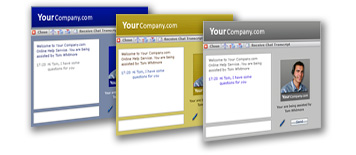
Simplified customer contact
Embed click-to-chat buttons into your website, your e-mail signature, the remote user’s desktop, and even user applications (DSA) to give them immediate access to your technical support professionals. Chat windows can be fully customized to adhere to your corporate image or create multiple skins to reflect different products of service groups.
One-click escalation and incident routing
Support incidents are transferred to available Operators or Operators with specific expertise with a single-click. This simple operation decreases the time associated with escalation processes, avoids multiple callbacks, and helps reduce incident backlog.
Optimized customer chat routing
Customized click-to-chat buttons automatically look for an available Operator who is best suited to resolve a support incident. Click-to-chat buttons in different locations/web pages can be set up to look for specific combinations of Operator characteristics such as languages spoken and technical specialties.
Co- surfing
Co-surfing allows Operators to guide customers through websites and offer training in less commonly used tools like advanced search and site maps. Shared surfing is also ideal for helping prospects and customers navigate sales demos, online training programs, and customer service pages.
Increased customer capacity
NTRsupport increases customer capacity by allowing up to five simultaneous remote support or live chat sessions. When Operators can address multiple support incidents at one time, wait times are decreased while customer satisfaction increases. And overall Operator productivity is enhanced while support costs are reduced.
Intelligent routing through pre-chat surveys
Pre-chat surveys collect basic information (location, preferred language, expertise required, product being used, etc.) from the customer. That information is used to channel support requests to the most best qualified, available Operator.
Quality assurance through post-chat surveys
Post-chat surveys collect feedback on Operator performance. Multiple-choice and open-ended responses are immediately available. Satisfaction Threshold questions ask for ratings on support experience and further feedback is requested when ratings fall below the set threshold. Quick follow-up with dissatisfied customers helps ensure customer retention.
Direct support for third party applications
The Direct Support Agent (DSA) integrates NTRsupport into any Windows-based application including CRM, ERP, Call Center, Training, or eLearning. The DSA continuously monitors applications that are being executed on any computer. Access to a real-time, online support channel opens when the end user selects an application listed by the Administrator.